Traditional cash registers and paper ledgers are no longer enough to keep up with the demands of the market and customers. The business environment has become more complex and interconnected: a store owner no longer cares only about collecting payment for goods, but needs an integrated system that links sales, inventory, expenses, staff and management decisions. This is where point-of-sale (POS) systems come in, having moved from being a way to complete a payment to a strategic tool that gives business owners a full, accurate view of what is happening in their store moment by moment.
In Saudi Arabia, for example, with the e-invoicing requirements introduced by the Zakat, Tax and Customs Authority (ZATCA), having a modern POS system is no longer a choice but a legal and regulatory necessity. And it doesn't stop there: these systems also support Vision 2030, which aims to digitize the retail sector and raise its efficiency.
What is a point of sale (POS) and why is it essential to any business?
When we hear the term “point of sale”, some may think it is just a cash register for issuing invoices or a way to collect payments from customers. In reality, the concept has evolved significantly in recent years and now represents an integrated system for managing businesses, whether retail stores, restaurants, pharmacies or even online stores.
Today, the point of sale is the operational brain of the business; it links financial operations, inventory management, the customer experience and performance reports, making it indispensable for every business owner who wants to grow and expand.
This system is made up of three core elements that work together in harmony:
First: Hardware
Hardware is the physical infrastructure a POS system is built on. It includes a set of tools that make operations faster and more accurate, such as:
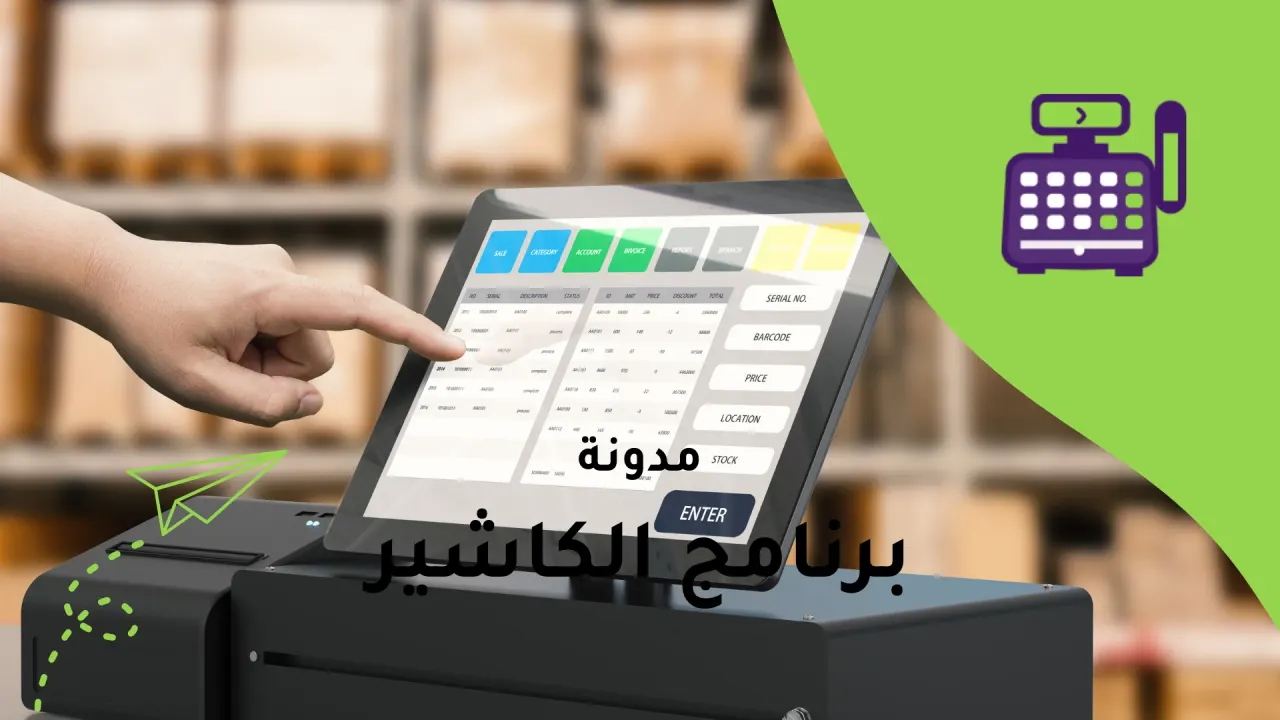
Cash registers: The central point for sales inside the store, where purchases are recorded and payments completed efficiently.
Interactive touchscreens: These screens make data entry faster and easier, and give staff a smooth experience that reduces errors and speeds up service.
Barcode scanners: They read products with high accuracy in seconds, saving time and improving the customer's checkout experience.
Receipt printers: They produce clear, organized receipts that reflect the store's professionalism and give customers a sense of trust.
Electronic payment devices: They support mada cards and credit cards, as well as digital wallets, to meet all customer preferences.
Having these devices together ensures a smooth experience for staff and customers alike, and makes sales faster, more accurate and better organized.
Second: Software
Software is the real brain and heart of a POS system: it runs operations and connects all the components. Its role is not limited to recording sales, but extends to:
Managing sales operations: Recording every purchase accurately and linking it to inventory and invoices.
Tracking and managing inventory: Monitoring quantities in real time, with alerts when products are running low to avoid lost sales opportunities.
Issuing detailed financial reports: Giving the business owner a clear picture of revenue, expenses and profit margin, which helps in making informed decisions.
Managing staff: Tracking each employee's performance in terms of transactions and sales, which raises efficiency and motivates the team.
Cloud access: With modern systems, the business owner no longer has to be in the store, and can follow performance from anywhere in the world over the internet.
These capabilities make software a strategic tool for running the business, not just a technical aid.
Third: Payment methods
Customer payment preferences no longer stop at cash. Today, any store's success depends on offering multiple, flexible payment options that suit all customers. They include:
Cash payment: The traditional option that is still widely used, especially in some sectors.
Bank cards: Such as mada, Visa and Mastercard, which are the most common and the easiest for customers.
Digital wallets: Such as Apple Pay and STC Pay, which let customers pay through their smartphones quickly and securely.
Payment through e-commerce platforms: The POS system can be linked to the online store, so all sales are recorded in one system whether they come from the physical store or online.
Offering these options builds customer trust and makes buying more convenient and flexible, which raises the likelihood of repeat purchases and increases brand loyalty.
Alcashier and its central role in POS systems
Now that we have reviewed the types of POS systems and their features, the most important question remains: which system can combine these advantages and deliver them in practice every day?
The answer comes through Alcashier, one of the leading smart solutions designed specifically to meet the needs of the Saudi and Arab market, combining ease of use, integration and compliance with local standards
What is cashier software?
Alcashier is not just a tool for collecting money or issuing invoices as in the past, but an integrated system for managing sales, inventory and customers. It runs in the cloud, letting business owners access their data at any time from anywhere.
The software is designed to be flexible and suit different business sectors, such as:
Traditional stores: Whether small or large, from clothing shops to supermarkets.
Restaurants and cafés: Making it easy to take orders and send them to the kitchen, while managing invoices and payments.
Pharmacies: Which need close inventory tracking while complying with medicine sales standards.
Multi-branch businesses and online stores: Where data needs to be connected in one place to avoid duplication and chaos.
This makes it a command center that gives business owners a full view to develop their business with confidence and effectiveness.
Alcashier's advantages over traditional systems
Working online and offline
One of Alcashier's strongest advantages is the ability to keep working continuously, with or without the internet. If the network connection drops, which can happen in any store or restaurant, the software doesn't stop; it keeps recording sales locally on the device. As soon as the internet returns, the system syncs all data to the cloud automatically.
This gives business owners complete peace of mind that their work will never stop, and makes the customer experience smoother and more comfortable, with no sign of any glitch or delay at payment.
Arabic and English support
Unlike many imported systems that are designed for foreign markets and can seem complicated in our local environment, Alcashier was built specifically to match the needs of the Saudi and Arab market. Its interface is clear and easy to use, and fully supports both Arabic and English.
This makes the software accessible to everyone, whether the employee is Saudi or foreign, and cuts training time and costs, because any employee can pick it up quickly without prior technical experience.
E-invoicing compliance in Saudi Arabia
One of Alcashier's main strengths is that it fully complies with the e-invoicing requirements of the Zakat, Tax and Customs Authority. This means the invoices the software issues meet the legal and technical standards approved in the Kingdom.
For the business owner, this not only protects against fines and violations, but also gives peace of mind that all financial transactions follow a safe, organized legal framework, which strengthens the trust of customers and business partners.
Integrated business management
Alcashier goes beyond being a sales tool to become an integrated management system that gives business owners full control of their business. From a single dashboard, they can:
Follow sales in full detail, moment by moment.
Monitor inventory precisely, with smart alerts when quantities run low.
Record expenses and compare them with revenue to calculate profit accurately.
Track staff performance and see who is most productive.
This integration saves business owners a great deal of time and effort, and lets them run their business more efficiently without needing multiple systems or complicated paperwork.
Integration with online stores
With the growing popularity of online shopping, it has become essential for online sales to be part of the management system. Alcashier lets you link the online store directly to actual inventory, so all sales, whether from the physical store or the online store, are managed from a single platform.
This prevents common mistakes such as selling products that are out of stock or duplicating stock counts, and helps business owners offer customers a professional shopping experience across every channel.
Advanced reports and analytics
One of the things that sets Alcashier apart is that it doesn't just record sales, but turns them into smart, analyzable data. Through accurate reports, business owners can find out:
Which products sell best and deliver the highest profitability.
When the peak times are, which helps in scheduling staff better.
The performance of each branch or employee individually, to identify strengths and weaknesses.
This analysis gives business owners a full view that helps them make strategic decisions based on accurate numbers, instead of relying on guesswork or trial and error.
How does Alcashier serve business owners?
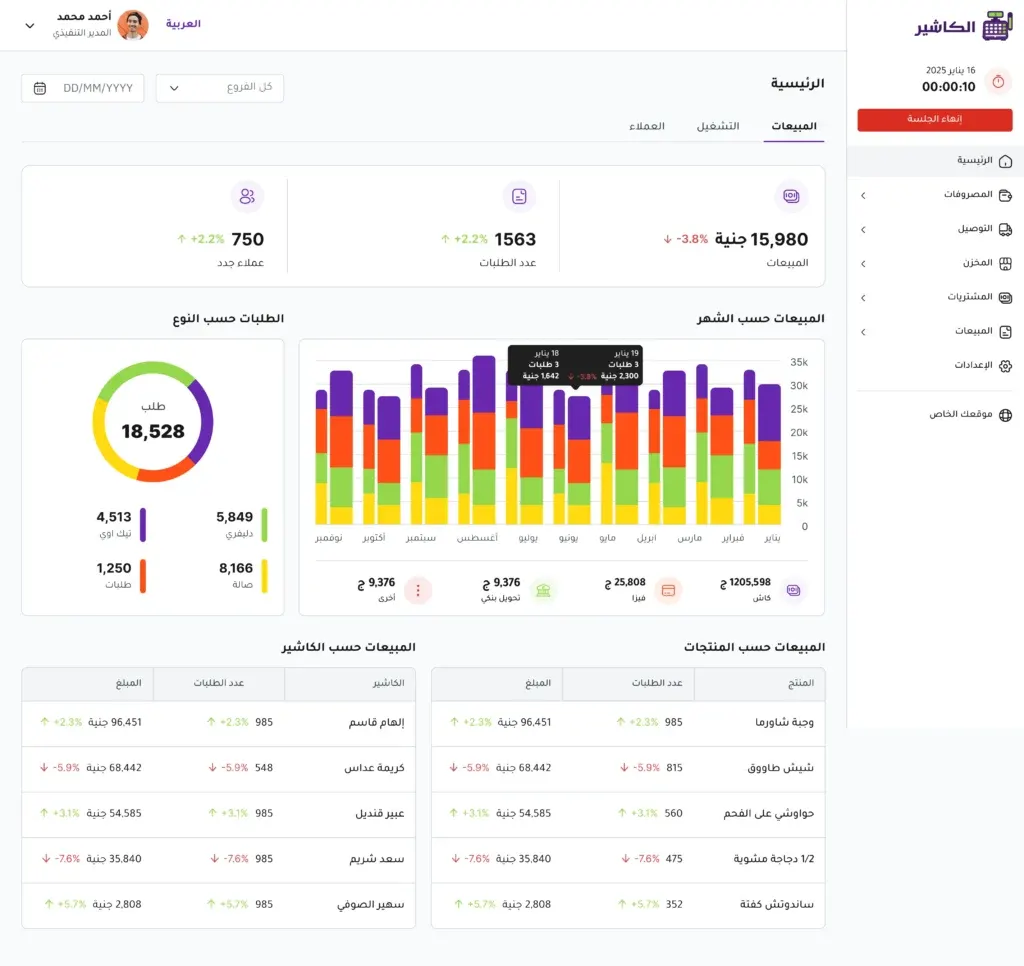
In restaurants and cafés
Alcashier is not limited to recording orders, but provides an integrated system for managing daily operations. As soon as staff enter an order, it is sent straight to the kitchen or barista screen, reducing errors caused by traditional communication and saving valuable time.
In addition, the software makes it easy to split bills among several customers at the same table, with support for different payment methods such as cash, bank cards and digital wallets. This makes the customer experience more flexible and professional, and gives the restaurant or café a modern, trustworthy image.
In traditional stores
For stores, whether clothing shops, supermarkets or electronics stores, Alcashier is an essential tool for tracking inventory accurately. It lets you track products moment by moment, with smart alerts when quantities run low or some products near their expiry date, which helps you restock on time.
This feature reduces the chance of running out of important products, and avoids the costs of spoiled or wasted goods. The result is more efficient inventory management and higher profit.
For multi-branch owners
Managing several branches is often a complex challenge, but Alcashier simplifies it through a single central dashboard. From it, the business owner can follow all branches at the same time, see the sales volume of each branch, and compare performance easily.
This way, they can identify the most profitable branches, spot the branches that need improvement, and allocate resources and attention more intelligently.
For online store owners
With e-commerce booming, online sales must be part of a store's management system. Alcashier offers direct integration with online stores, so online sales are recorded alongside physical sales, with inventory updated in real time.
This prevents common problems such as selling out-of-stock products, and makes the customer experience smoother and more reliable, which builds customer trust in the store and increases their loyalty.
Types of POS systems
Traditional POS (fixed cash register)
These systems are the original core of the point-of-sale idea. They rely mainly on physical equipment fixed in one place inside the store. They are usually connected to a computer or cash register and a receipt printer, and are used to enter products manually or by barcode.
Although they seem outdated compared with modern systems, they are still used in many small stores and kiosks that don't need technical complexity. Their main advantage is their simplicity and low upfront cost, but they suffer from major drawbacks such as no remote monitoring, no advanced reports, and no smart inventory management.
Practical example: A small grocery in a local neighborhood may be content with a traditional cash register for daily receipts, but it will miss out on accurate sales analysis or knowing precisely which products sell best.
Mobile POS
This is an advanced step toward flexibility: the system is no longer tied to a fixed device, and can run on a tablet or smartphone. These systems are ideal for restaurants and cafés, where staff can take orders at the table and send them to the kitchen with one tap, and can collect payments through a portable device linked to a mada card or digital payment apps.
The advantage of these systems is that they provide very fast service and reduce human error, especially in busy places. They also give the venue a modern image, and make customers feel they are getting a smooth, quick experience.
Example: A modern restaurant in Riyadh uses iPads to take orders at the tables, so the order goes straight to the kitchen screen, while the customer can pay with Apple Pay in moments.
Cloud POS
This is the most widespread type in today's digital era. The idea is that all data is stored and managed online (in the cloud), which means the store owner can log in to their account from any device, whether in the office, at home, or even while traveling.
The main advantage of this type is access at any time from anywhere, plus automatic updates and continuous data backup, which lowers the risk of data loss. Cloud systems also offer advanced dashboards that show real-time reports on sales, profit, staff performance and inventory movement.
Example: A fashion chain with several branches in Jeddah, Riyadh and Dammam lets its manager follow each branch's sales moment by moment from their personal phone, and see the difference between branches within the same day.
POS integrated with online stores
With the spread of e-commerce, the need arose for POS systems that link online sales with sales in physical stores. This type lets you unify inventory management, so quantities sold, whether through the website or inside the store, are deducted automatically.
The advantage of this system is that it prevents quantity conflicts or selling unavailable products, and gives the store owner a full view of how the different sales channels are performing.
Example: An electronics store with a website and a main branch: when a phone is sold on the website, it is deducted from inventory immediately, and there is no conflict when selling from the branch.
Specialized POS
Some systems are designed specifically for particular fields such as restaurants, pharmacies or medical clinics. These systems offer extra tools that meet the needs of those sectors, such as:
In restaurants: table management, bill splitting, and kitchen integration.
In pharmacies: tracking medicines by expiry date, and linking the system to prescriptions.
In clinics: tracking patient appointments, and integrating payments with their medical records.
Features of modern POS systems
Smart inventory management
Tracking inventory is no longer a tiring manual task, but an automatic, smart one. A POS system tracks every entry and exit of products in real time, and shows an accurate picture of the quantities available in the warehouse or on store shelves.
Most importantly, it sends proactive alerts when a given product is about to run out, which prevents lost sales opportunities due to stock shortages. On the other hand, it also helps avoid piling up unwanted products, through reports showing sales movement for each item. This smart management means lower losses and higher profits.
Accurate and varied financial reports
One of the strongest tools of modern POS systems is their ability to turn numbers into strategic information. The store owner can get daily, weekly or monthly reports on:
Total sales and profit.
Best-selling products.
The performance of each employee or branch.
Expenses and their impact on revenue.
This data helps in making fact-based decisions, such as increasing the quantity of a product because of high demand, adjusting prices to boost profitability, or even restructuring teams based on their performance.
Improving the customer experience
The customer experience can be the deciding factor between a store's success and failure. Modern POS systems provide a smooth experience thanks to:
Support for almost all payment methods (cash, bank cards, digital wallets such as Apple Pay and STC Pay).
Much faster payment, to shorten waiting lines.
Clear, organized invoices that build trust and professionalism.
This makes the customer feel comfortable and more likely to come back to buy again, which in turn increases customer loyalty and the value of their sales over the long term.
Managing staff and permissions
Managing human resources in stores has become easier and more transparent. Through the system, the store owner can:
Set different permissions for each employee (such as sales only, or sales with inventory management).
Track each employee's performance in terms of number and value of sales.
Prevent any manipulation or repeated mistakes through transparency in operations.
This not only maintains work discipline, but also helps motivate capable employees through objective evaluation based on clear data.
Frequently asked questions about POS systems
Can a POS system be used without a constant internet connection?
Yes, modern systems are designed to work in all conditions. If the internet drops, which can happen in any store or restaurant, the system keeps recording all sales locally on the device. As soon as the connection returns, it syncs automatically with the cloud with no manual intervention. This means sales never stop and customers don't notice any glitch in their experience, and it also protects the business owner from losing important data or confusion in the accounts.
Are POS systems suitable for small businesses, or only for large companies?
POS systems are designed to be flexible and suit businesses of all sizes. Small businesses benefit from them by simplifying daily work, saving time and reducing manual errors. Large companies and store chains benefit from more advanced features such as branch management, detailed reporting and data analysis to help them make strategic decisions. In short: these systems are not just for the big players; they have become available and essential for everyone.
What is the difference between a traditional cash register and a modern POS system?
Traditional cash register: Its role is limited to recording sales and issuing invoices; it is very limited and doesn't provide analytics or detailed tracking.
Modern POS system: It works as an integrated platform for managing the store. It links sales, inventory, staff, expenses and performance reports. It is also connected to the cloud, so the business owner can follow their business from anywhere. The key difference is that a modern system doesn't just sell; it helps develop the business and increase efficiency and profitability.
Are POS systems secure for storing data?
Yes, security is one of their most important advantages. Data is stored on secure cloud servers with high-level encryption, along with regular backups to prevent data loss. Some systems also offer extra protection such as two-step login and different permissions for each employee. This means sales and customer data, which are among a store's most important assets, are always protected against breach or loss.
Can a POS system be linked to online stores and delivery apps?
Absolutely. Integration has become a basic feature of modern POS systems. The system can be linked to e-commerce platforms such as Shopify or WooCommerce, so sales are deducted from inventory immediately whether they happen online or in the store. It can also be linked to delivery apps to manage orders smoothly. This integration provides unified management of all sales channels, and prevents mistakes such as selling unavailable products or inventory conflicts.
Do POS systems support e-invoicing in Saudi Arabia?
Yes, and this is essential. Systems approved in the Kingdom are designed to be fully compliant with the e-invoicing requirements of the Zakat, Tax and Customs Authority. This means the invoices the system issues are legally approved, and protect the business owner from any violations or fines. In addition, e-invoicing compliance strengthens trust between the store and its customers, who see transparent, organized dealings.
What hardware is needed to use a POS system?
The hardware differs depending on the type of system:
Traditional systems: Need a computer or fixed cash register, a receipt printer, a barcode scanner, and an electronic payment device.
Cloud or mobile systems: A tablet or smartphone running Alcashier is often enough, with a small printer and an electronic payment device.
This flexibility means the business owner can choose what suits the size of their store and their budget, without needing huge investments from the start.
Do staff need training to use the system?
Usually not. Most modern POS systems come with simple, easy-to-use interfaces that support Arabic and English, making them suitable for all employees. In many cases, a new employee can start using the system after short training of no more than a few hours. This lowers training costs, and speeds up hiring and getting new staff settled into the store.
Conclusion
In a fast-changing market with rising customer expectations, a point of sale is no longer just a way to collect payments, but an operational and strategic platform that links sales with inventory, staff, reports and modern payment methods. Adopting a POS system that complies with e-invoicing in Saudi Arabia and is linked to e-commerce and online/offline operation gives you real-time visibility, sharper decisions and higher profits. And as digitization grows under Vision 2030, choosing the right Alcashier setup becomes an investment in operating efficiency, the customer experience and your business's growth. Start by assessing your business's needs, set your priorities, and let the point of sale be the smart brain that leads your business with confidence.
Mobile cashier device: The solution for managing sales with ease and flexibility
In today's fast-paced business world, flexibility has become the deciding factor between success and falling behind competitors. If we look at the sector…
Alcashier | A POS system that works online and offline
All businesses today seek to keep pace with the technological developments in the markets, especially with the wide spread of e-commerce and growing reliance…
POS systems: The complete guide to managing modern sales in Saudi Arabia
In the age of digital transformation in the Saudi business sector, point of sale (POS) systems have become the cornerstone of managing sales…
The post Point of sale: types, features and how to make the most of it in your business appeared first on Alcashier.