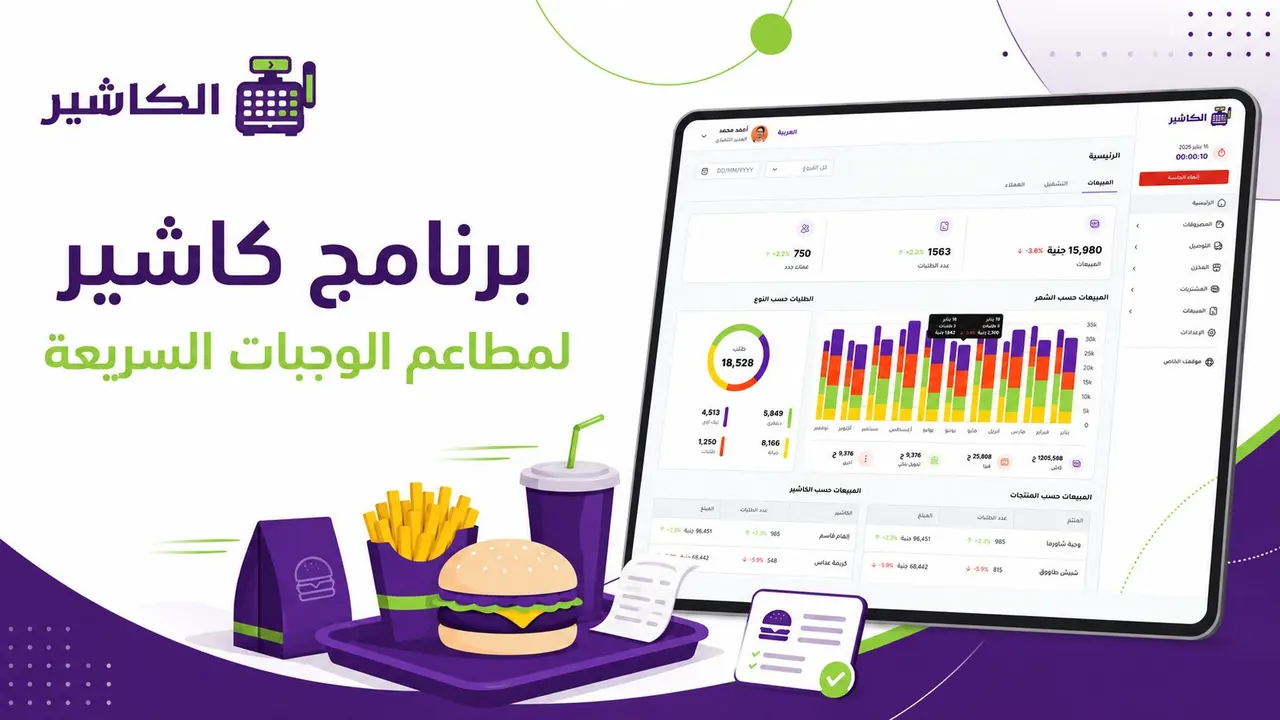
Running a fast-food restaurant is not as simple a job as it looks from the outside. Customers expect fast service, an accurate order, flexible payment, and a smooth experience from the moment they walk in or order until they receive their meal. At the same time, the restaurant owner needs to follow sales, monitor inventory, manage staff, analyze the most-ordered items, and reduce the errors that can affect profits and customer satisfaction.
This is where restaurant cashier software comes in, as an essential tool and not just a device for recording invoices. In a fast-food environment, every second counts. A small delay in entering an order, a mistake in a product's price, a sudden shortage of an ingredient, or unclear daily reports can cause repeated losses that are hard to notice at first but become clearly visible over time.
Choosing the right cashier software for a fast-food restaurant does not mean looking for the most complicated system or the one packed with the most features; it means choosing the point-of-sale system that actually serves the nature of your business. A fast-food restaurant needs speed, accuracy, ease of use, practical inventory management, clear reports, and support for modern payment methods.
In this article, we review the key features you really need when choosing point-of-sale software for a fast-food restaurant, and how the right system helps you improve the customer experience, cut operational chaos, and make better decisions based on real data.
Manage your sales and inventory in seconds with Alcashier!
Control sales, inventory and users in moments, and give your business an integrated system that runs smoothly without complexity.
Create your store for freeWhy do fast-food restaurants need specialized cashier software?
Fast-food restaurants rely on a high volume of orders, constant activity, and quick decision-making. That is why traditional methods such as notebooks, manual spreadsheets, or even simple cashier systems that do not support the nature of restaurants are not enough.
In this type of business, the workload is high, especially at peak times such as lunch, dinner, weekends and busy seasons. If you do not have POS software capable of organizing operations, you may face recurring problems such as delayed orders, invoice errors, difficulty keeping track of items, and an inability to know the restaurant's real performance.
Specialized restaurant cashier software helps you manage orders quickly, organize products and modifiers, follow payments, and get accurate reports on daily sales. It also gives your team an easy interface that lets them enter orders quickly without long training or complicated steps.
The aim of the system is not only to make selling easier, but to build a clear operational process that connects the cashier, the kitchen, inventory, reports and management in one place.
The difference between regular cashier software and restaurant cashier software
Some people may think that any cashier software can serve fast-food restaurants, but the truth is that restaurants' needs differ from those of traditional stores. A store usually sells ready-made products at a fixed price, while a restaurant deals with meals, modifiers, different sizes, offers, ingredients, and custom orders based on each customer's wishes.
Regular cashier software
Regular cashier software usually focuses on recording sales, issuing invoices, and perhaps simple inventory tracking. This may suit some small businesses, but it is not always enough for a fast-food restaurant that needs to organize orders and link them to the kitchen and inventory.
Restaurant cashier software
Restaurant cashier software, on the other hand, is designed to handle the nature of food orders. It supports dividing the menu into sections, adding options such as size or modifiers or removing a particular ingredient, managing offers and combo meals, and linking orders to the workflow inside the restaurant.
A restaurant point-of-sale system also helps you understand how each item performs, identify your best-selling products, and pinpoint the times when demand rises, making management more accurate and professional.
The key features fast-food restaurant cashier software needs
Choosing the right system starts with understanding your restaurant's needs. You do not necessarily need dozens of features you will never use, but there are essential features you cannot ignore if you want to run a fast-food restaurant efficiently.
1. Fast order entry
Speed is the most important factor in fast-food restaurants. That is why restaurant cashier software should be easy to use, with a clear interface and fast response. Staff should be able to select items, edit the order, add notes, and confirm the invoice within seconds.
The fewer the steps to enter an order, the faster the service and the lower the chance of error. A complicated or slow interface directly affects the customer experience, especially when there is a queue or many orders at the same time.
It is best if the system supports a clearly organized menu, such as dividing meals into categories: burgers, chicken, drinks, desserts, family meals, modifiers, and offers. This organization helps staff reach a product quickly and makes the selling process smoother.
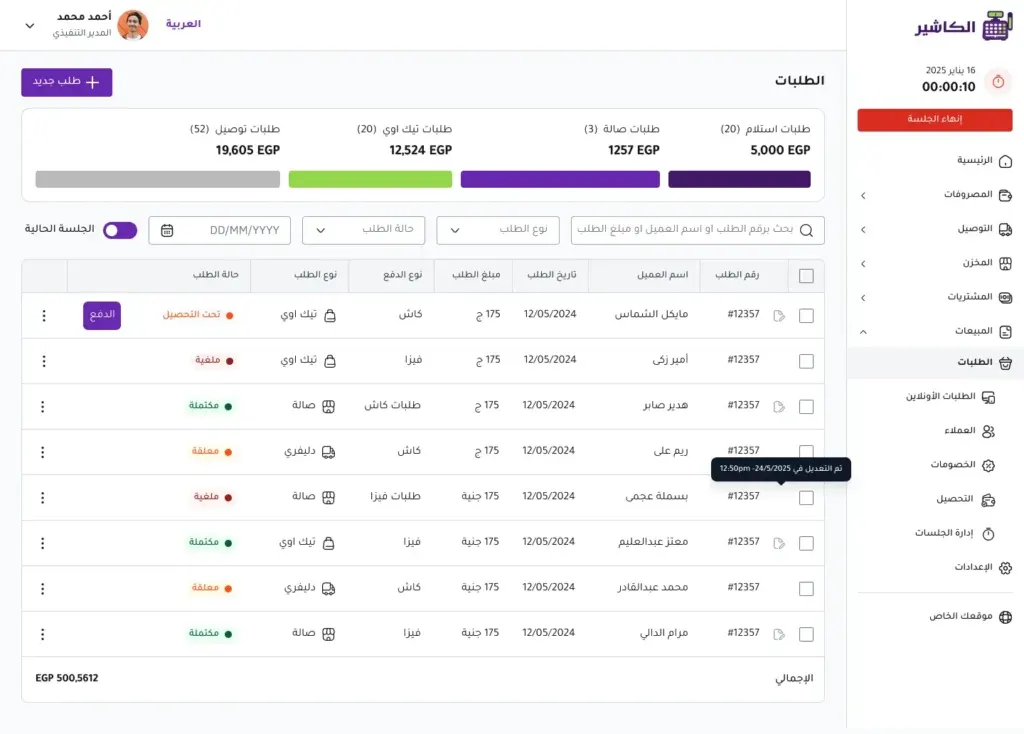
2. Support for order changes and modifiers
In fast-food restaurants, not all customers order a meal the same way. Some want a meal without sauce, another wants extra cheese, a different drink, or a bigger size. That is why POS software needs to support modifiers and changes easily.
This feature reduces errors between the cashier and the kitchen, because the order appears with its details clearly shown instead of relying on verbal instructions or handwritten notes. It also helps calculate the price accurately when ingredients are added or a meal size is upgraded.
A good system should make changes simple, not turn the order into a complicated process. Staff need to record the order quickly while staying accurate.
3. Easy menu and offer management
Fast-food restaurant offers change constantly. There may be a lunch deal, a combo meal, a seasonal discount, or a family bundle. That is why the point-of-sale system should let you manage the menu and offers easily without complicated technical intervention.
The restaurant owner or manager can update prices, add new items, hide an unavailable item, or create offers for a specific time. This flexibility is very important because relying on manual updates or slow systems may cause a mismatch between the prices displayed and the prices recorded on the invoice.
Menu management also helps you test new products and see how they perform through reports. If you add a new meal, you can see how many times it has sold, its average value, and how much it affects total sales.
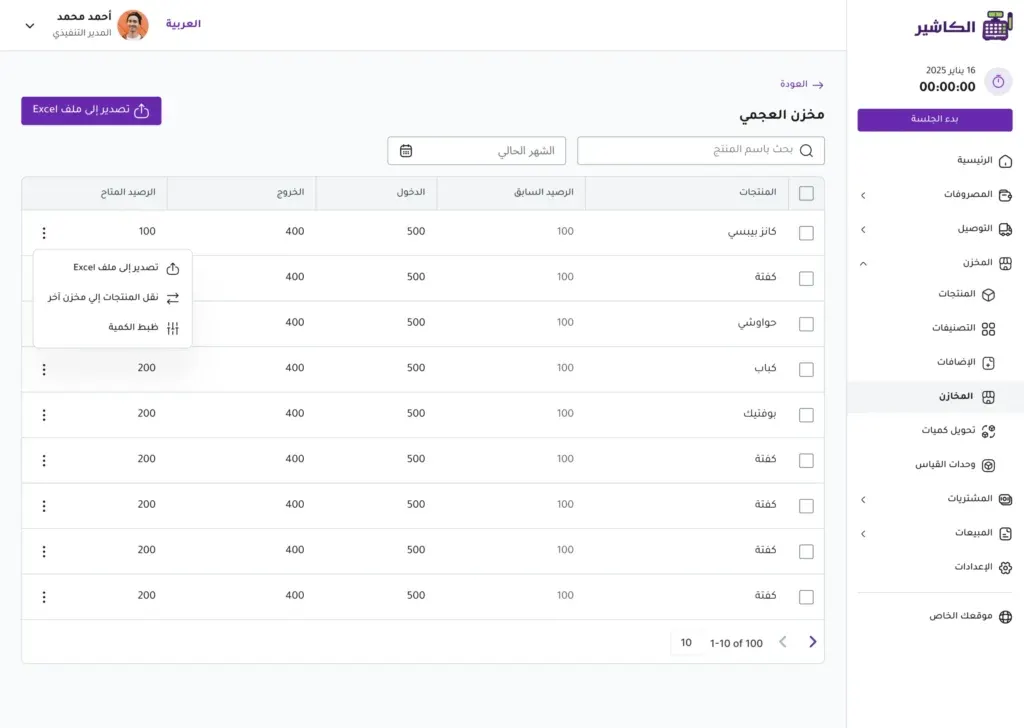
4. Inventory management linked to sales
One of the biggest challenges in fast-food restaurants is inventory management. Running out of a key ingredient such as bread, chicken, fries or sauce can stop the sale of several items at once. On the other hand, overstocking without planning can lead to spoiled products and higher costs.
That is why it is important for sales management software to be linked to inventory. When a particular meal is sold, the system should help track ingredient consumption or at least monitor the available quantities of the main items.
This feature gives you a better view of what is consumed daily, what needs reordering, and what may be surplus. Over time, the data helps you forecast the right quantities by day of the week, season or peak time.
Inventory management is not just knowing what is available; it is a way to protect profits, reduce waste, and improve planning.
5. Working online and offline
In fast-food restaurants, sales cannot stop because the internet goes down. Even if the outage lasts only minutes, it can cause a long queue, stress for staff, and a bad customer experience. That is why it is important to choose point-of-sale software that supports online and offline operation.
A system that works without internet lets the restaurant keep selling even when there is a connection problem. Once the internet returns, data can be synced automatically so reports and sales stay up to date.
This feature is especially important for restaurants with heavy sales pressure or those operating in locations where the connection may be unstable. Among modern solutions in this field is Alcashier, which supports online and offline operation to help business owners keep sales going without unnecessary interruption.
6. Support for modern payment methods
Customers today expect multiple payment options. Some prefer to pay by card, and some use digital wallets or mobile payment methods. That is why restaurant cashier software should support modern payment methods and make them easy to record in the system.
Supporting varied payment does not only improve the customer experience; it also helps management track payments accurately. It is important to know your cash sales, card sales, and sales through other payment methods, so you can reconcile accounts at the end of the day.
The better organized payment is within the POS software, the easier the daily close becomes, and the fewer the errors related to amounts or payment methods.
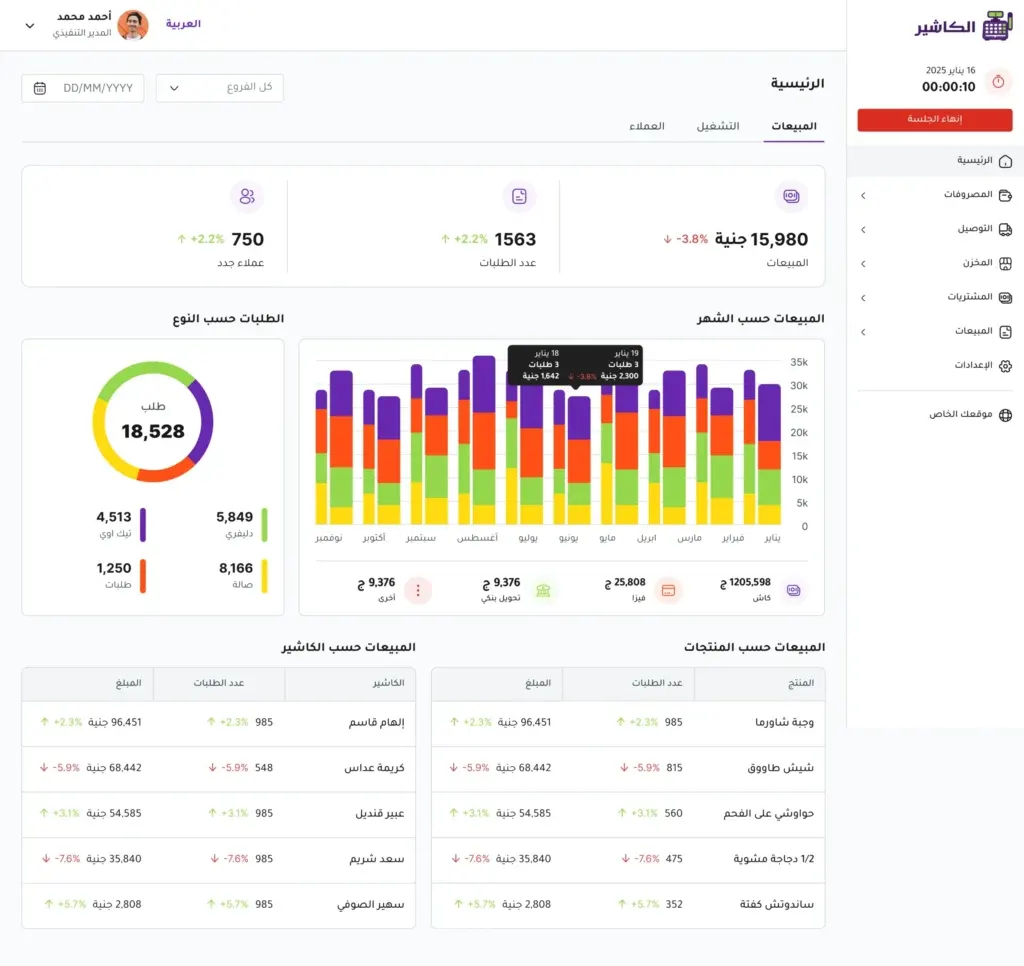
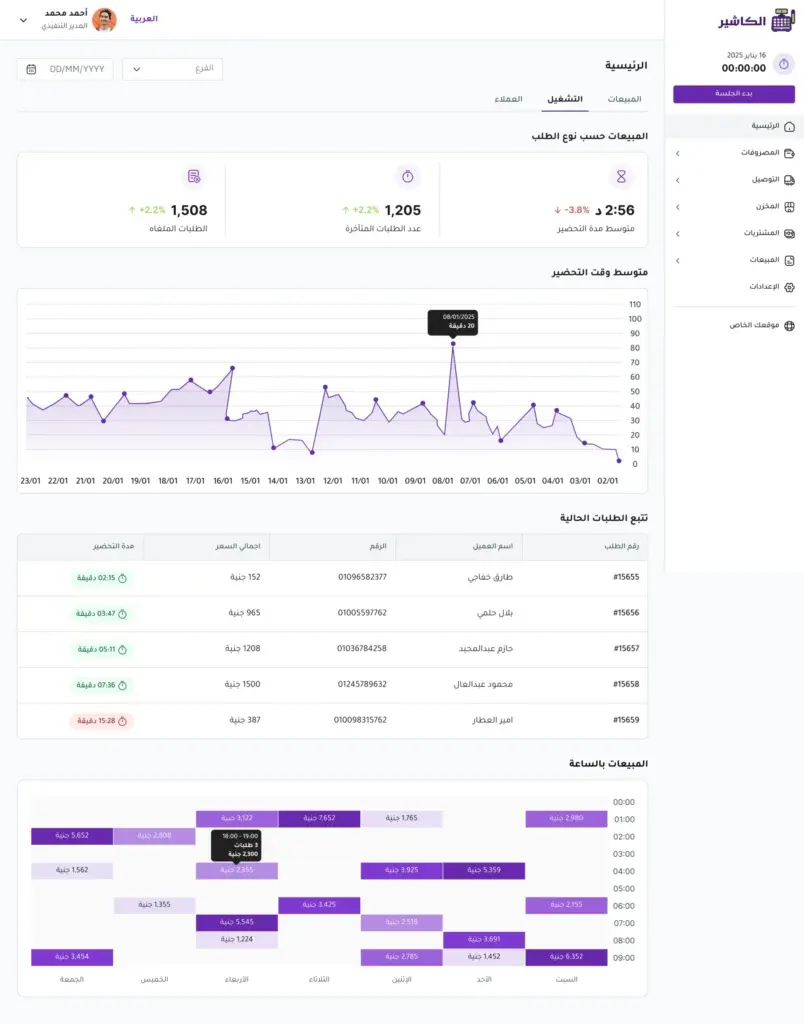
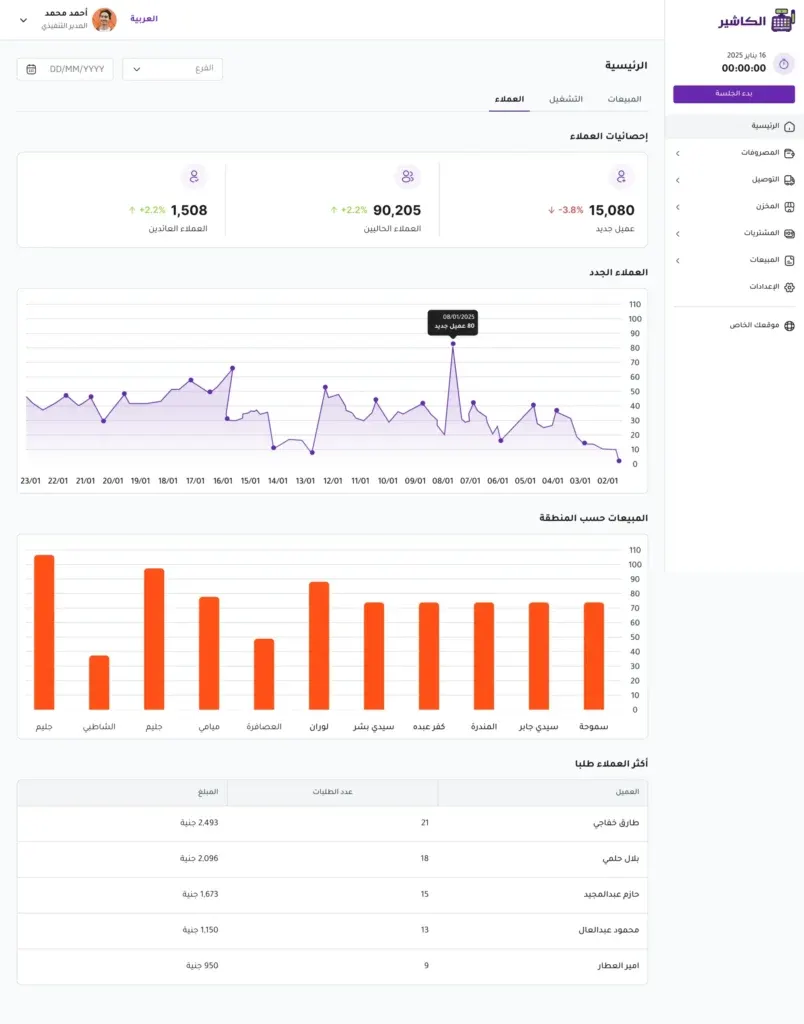
7. Clear, instant sales reports
Reports are the difference between running a restaurant by guesswork and running it by data. Through reports, you can see total sales, the number of orders, the average invoice value, the best-selling products, the busiest times, and the performance of staff or branches.
Sales management software should provide easy-to-understand reports that do not require complicated accounting expertise. The restaurant owner needs a clear view that helps them make practical decisions: should I add more staff at a certain time? Should I drop an underperforming item? Should I repeat a successful offer? Do I need to improve inventory?
Daily, weekly and monthly reports help you monitor performance continuously, not just at the end of the month when it is too late to deal with problems.
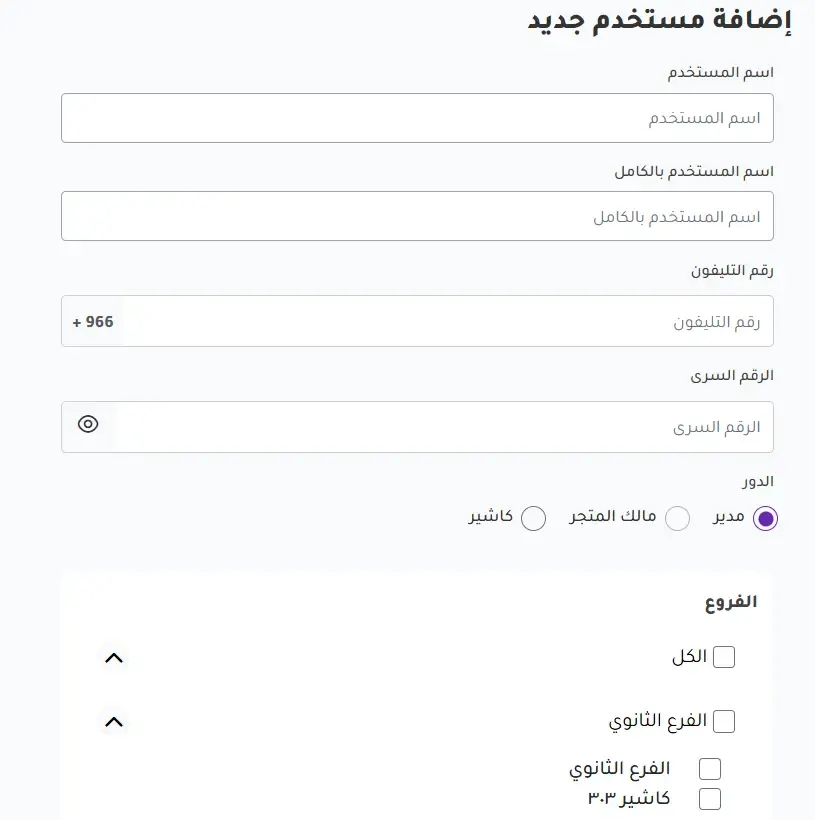
8. Staff and permissions management
In fast-food restaurants, more than one employee works on the system. That is why each user needs clear permissions. The cashier may only need to record orders, while the manager needs to review reports, edit prices, or cancel invoices when necessary.
Having permissions within the point-of-sale system reduces errors and protects data. It also helps you trace operations and know who performed a particular action, such as cancelling an order, applying a discount, or editing an invoice.
This feature is important for maintaining operational discipline, especially when there is more than one shift or more than one branch.
9. Ease of use and training
Even the most powerful system can become a burden if it is complicated. Fast-food restaurants need to train staff quickly, especially given staff turnover and new hires joining. That is why restaurant cashier software should be simple and clear.
An easy Arabic interface, clear buttons, few steps, and a practical design are all factors that make a system suitable for daily use. The faster an employee can use the system, the greater the service efficiency and the fewer the errors.
This is where choosing a solution such as Alcashier matters, as it offers an interface that supports Arabic and English, making it suitable for diverse teams and giving restaurant owners more flexibility in operations.
10. Branch support and future expansion
You may start with one restaurant, but as the business succeeds you may think about opening a new branch. That is why it is best to choose POS software that can support expansion instead of relying on a limited system you will have to replace later.
Branch support helps you follow each branch's sales, compare performance, manage inventory, and see which products do better in one location than another. It also gives you a complete picture of the business instead of following each branch separately.
Even if you are not planning to expand now, choosing a system that can grow saves you time, effort and costs in the future.
How does POS software help reduce order errors?
Order errors are among the problems that most upset customers and affect a restaurant's reputation. The mistake may be in the type of meal, the modifiers, the size, the payment method, or even the price. And under work pressure, mistakes become more likely if there is no clear system.
Good point-of-sale software helps reduce these errors by organizing orders within a single interface. When staff select items from the menu, prices appear automatically, notes are added clearly, and the invoice is issued based on accurate data.
Having defined options for modifiers and changes also reduces reliance on handwriting or memory. Instead of an employee forgetting a particular note, the order details are clearly recorded in the system.
Reducing errors does not only mean improving customer satisfaction; it also means reducing waste, re-preparing orders, compensation, and negative reviews.
The role of sales management software in improving fast-food restaurant profits
Profit in fast-food restaurants does not depend only on increasing sales; it also depends on controlling costs, reducing waste, knowing the most profitable items, and improving service speed.
Sales management software gives you data that helps you understand what is happening inside the restaurant. For example, you may discover that a particular item achieves high sales but does not make a good profit because of the cost of its ingredients. Or you may find that a certain offer increases the number of orders but lowers the average invoice value.
This information helps you adjust prices, improve offers, rearrange the menu, or focus on items with a better profit margin. It also helps you know your peak times and prepare for them with the right number of staff and enough inventory.
Without data, decision-making is based on personal impression. With a clear system, decisions become more accurate and realistic.
What should you look for before choosing POS software for your restaurant?
Before subscribing to any POS software, it is important to ask yourself a set of practical questions. These questions help you choose a system that fits your actual needs, not just one that looks good in a marketing presentation.
Is the system suitable for the nature of fast-food restaurants?
Not every selling system suits restaurants. Make sure the system supports the menu, modifiers, offers, order speed, and item management in a practical way.
Can staff use it easily?
A complicated system may slow service instead of improving it. Look for a clear, easy interface, ideally one that supports Arabic if your team relies on it.
Does it support offline operation?
An internet outage can happen at any time. That is why it is best to choose a system that does not stop selling when there is a connection problem.
Does it provide clear reports?
Reports are among the most important reasons for using a point-of-sale system. Make sure the system shows useful data on sales, products, peak times, and payment methods.
Does it support growth and expansion?
If you plan to open branches in the future, choose a scalable system that supports managing more than one location.
Why is relying on traditional methods not enough?
Traditional methods such as a notebook, Excel, or a simple cashier may seem like a suitable solution at first, especially for small restaurants. But they become exhausting as orders increase, staff multiply, and the product list expands.
Manual methods leave data prone to errors. An order may be recorded inaccurately, inventory may not get updated, or expenses may not be calculated correctly. It is also hard to pull out clear reports quickly when needed.
Restaurant cashier software, on the other hand, brings the core operations together in one place. It helps you record orders, issue invoices, follow sales, monitor inventory, and manage reports faster and more accurately.
Moving from manual management to professional point-of-sale software does not mean making work more complicated; it means simplifying it and relying less on memory and repeated checking.
How does Alcashier support fast-food restaurant owners?
Alcashier is an example of the modern solutions that help restaurant and store owners manage their daily operations through a practical system that supports sales, inventory, expenses, staff, and reports in real time.
For fast-food restaurants, the system helps organize selling, speed up order entry, track performance, and manage operations more clearly. Support for online and offline operation also gives the restaurant important flexibility, especially at times when selling cannot be halted because of a connection problem.
In addition, Alcashier supports both Arabic and English, making it suitable for different work environments and giving restaurant owners an easier experience for their team. These aspects make the system a suitable choice for business owners looking for cashier software that combines simplicity with the ability to handle day-to-day details.
Common mistakes when choosing cashier software for fast-food restaurants
Choosing the wrong system can cause operational problems instead of solving them. That is why it is important to avoid some common mistakes when looking for restaurant cashier software.
Choosing a system based on price alone
Price is an important factor, but it should not be the only one. The cheapest system may lack essential features such as reports, inventory management, or offline operation, causing hidden costs later.
Ignoring ease of use
If the system is hard for staff to use, it will affect service speed. Fast-food restaurants need a fast, simple system that does not confuse the team.
Not paying attention to reports
Some restaurant owners focus only on recording sales and ignore the importance of reports. But reports are what help you understand performance and make better decisions.
Choosing a system that cannot scale
The system may suit you at first, but it may become limiting if the restaurant expands or branches increase. It is best to choose a system that can keep pace with your business's growth.
Not trying the system before relying on it
It is important to try the system or learn how it works before making a decision. Make sure it suits your restaurant, your team, and your daily needs.
Signs your restaurant needs a new point-of-sale system
You may be using an old system or a traditional method and not know whether it is time to change. There are clear signs that your restaurant needs a more advanced point-of-sale system.
If orders are delayed because recording is slow, if invoice errors keep recurring, or if you do not know your best-selling products accurately, these are important signs. Likewise, if you have difficulty reconciling cash with sales, or you do not have clear reports at the end of the day, it means your current system is not serving you as it should.
Also, if you rely on manual inventory checks or discover ingredient shortages too late, it is time to use sales management software linked to inventory management.
Change in this case is not a luxury; it is a necessary step to improve efficiency and reduce losses.
How do you choose the best restaurant cashier software for your business?
The best software is not necessarily the most famous or the most expensive, but the one that suits the nature of your restaurant, the size of your operations, and your future plans. Start by identifying the main problems you want to solve: is it order speed? Inventory management? Reports? Multiple branches? Payment methods?
Then compare systems based on practical features. Look for a system that supports the language that suits your team, works efficiently under pressure, provides clear reports, and helps you follow sales and inventory from one place.
You should also consider technical support and ease of setup. A good system does not end its role when you subscribe: there should be support that helps you when you need it and keeps your business running.
If a system offers a balance of ease of use, powerful reports, inventory management, and online and offline operation, it is closer to the needs of fast food restaurants.
Manage your sales and inventory in seconds with Alcashier!
Control sales, inventory and users in moments, and give your business an integrated system that runs smoothly without complexity.
Create your store for freeFrequently asked questions (FAQ)
What is restaurant cashier software?Restaurant cashier software is a system that helps restaurants record orders, issue invoices, manage products, track sales, and organize daily operations. It differs from an ordinary cashier system because it supports the nature of restaurants, such as meals, modifiers, offers, and item reports.
Do fast food restaurants need a point of sale system?Yes, because fast food restaurants depend on speed, accuracy, and a high volume of orders. The right point of sale software helps reduce mistakes, speed up service, track inventory, and analyze sales better.
What is the difference between POS software and sales management software?POS software focuses on managing sales operations at the point of payment, such as recording orders and issuing invoices. Sales management software covers broader performance tracking, such as reports, product analysis, sales monitoring and linking data to inventory and expenses.
Can cashier software be used without internet?Some modern systems support working without internet, which is a very important feature for restaurants. When the connection drops, you can keep recording sales, and the data is synced once the internet is back, depending on the capabilities of the system you use.
How do I know if cashier software suits my restaurant?A system suits you if it is easy to use, fast at recording orders, supports the menu and modifiers, provides clear reports, helps manage inventory, and supports the payment methods your customers need. It is also best if it can scale in case you plan to open new branches.
Conclusion
Choosing restaurant cashier software for fast food restaurants is no longer just a technical decision. It has become a management decision that affects service speed, order accuracy, customer satisfaction, waste levels, and the owner's ability to understand the real performance of the business.
A successful restaurant does not depend only on the quality of its food. It also needs a clear operating system that helps the team work quickly and with discipline. With modern POS software, the restaurant owner can manage sales, inventory, staff, and reports from one place, instead of relying on guesswork or manual methods.
When choosing POS software for your restaurant, focus on the features you really need: fast order entry, support for modifications, menu management, linking inventory to sales, online and offline operation, multiple payment methods, clear reports, and staff permissions. These are the foundation that helps your restaurant grow steadily and cut down on daily mistakes.
Alcashier comes as a modern solution for restaurant and store owners looking for a point of sale system that combines ease of use, flexibility, and real-time business management. If you want to grow your fast food restaurant, starting with a professional cashier system may be the most important step toward more organized and more profitable operations.

Types of restaurants and the best cashier software for each
No two restaurants work in exactly the same way. A fine dining restaurant that welcomes guests at elegant tables is radically different from a…
Business digitization: why has POS software become a necessity, not an option, for every business owner?
Business digitization is no longer an optional extra that a business owner can postpone until later. It has become an essential step to ensure continuity and growth…

How to choose the right POS system for your restaurant before Eid al-Adha?
Eid al-Adha is an exceptional season for the restaurant and food sector in the Arab world. This period sees a sharp rise in demand for…
The post Fast food restaurant cashier software: which features do you actually need? appeared first on Alcashier.