A point of sale (POS) system is the environment where the customer’s desire to buy meets the business’s ability to collect payment and manage operations. Historically it was limited to a cash drawer and a receipt printer; today it has evolved into an operating platform that links the sales interface with inventory, accounting, payments, analytics and marketing, so that information flows from the moment a barcode is scanned all the way to bank settlement with almost no manual intervention. This system reduces friction with the customer, speeds up service and gives management instant visibility for data-backed daily decisions (what should we reorder? where are we wasting? who are our most valuable customers?).
A POS also works as a policy center: where are taxes applied? How are discounts calculated? Who has the authority to void a transaction or open the cash drawer? Thanks to integrations and APIs, it can now talk to your online store, your shipping company and your payment gateway at the same time, so manual spreadsheets and “send me the Excel file” messages disappear.
Why does POS matter to you?
Faster service and shorter queues:
Every extra second in a sale raises the chance that the customer gets restless or abandons the purchase. Intuitive touch interfaces, smart button layouts, reliable barcode scanning and contactless payment can cut transaction time from a minute and a half to under 20 seconds in light retail scenarios. That difference translates directly into more transactions per hour and higher revenue at peak times.
Higher accuracy and fewer errors:
Manual pricing exposes you to “decimal point” errors and unintended discounts. When prices and taxes are managed from a central database and applied automatically, most errors disappear, and later reviews become much easier. In addition, an audit log provides a clear trail of any change, which limits attempts at internal fraud.
Real-time inventory and smarter purchasing decisions:
Every sale deducts a quantity from inventory immediately, shows up in item movement reports and triggers an alert if the balance drops below a set level. This way, stockouts of high-demand items become less frequent, and so does the cash tied up in slow-moving items. The result: better inventory turnover and freed-up cash that can be invested in profitable items.
Instant management visibility (real-time dashboards):
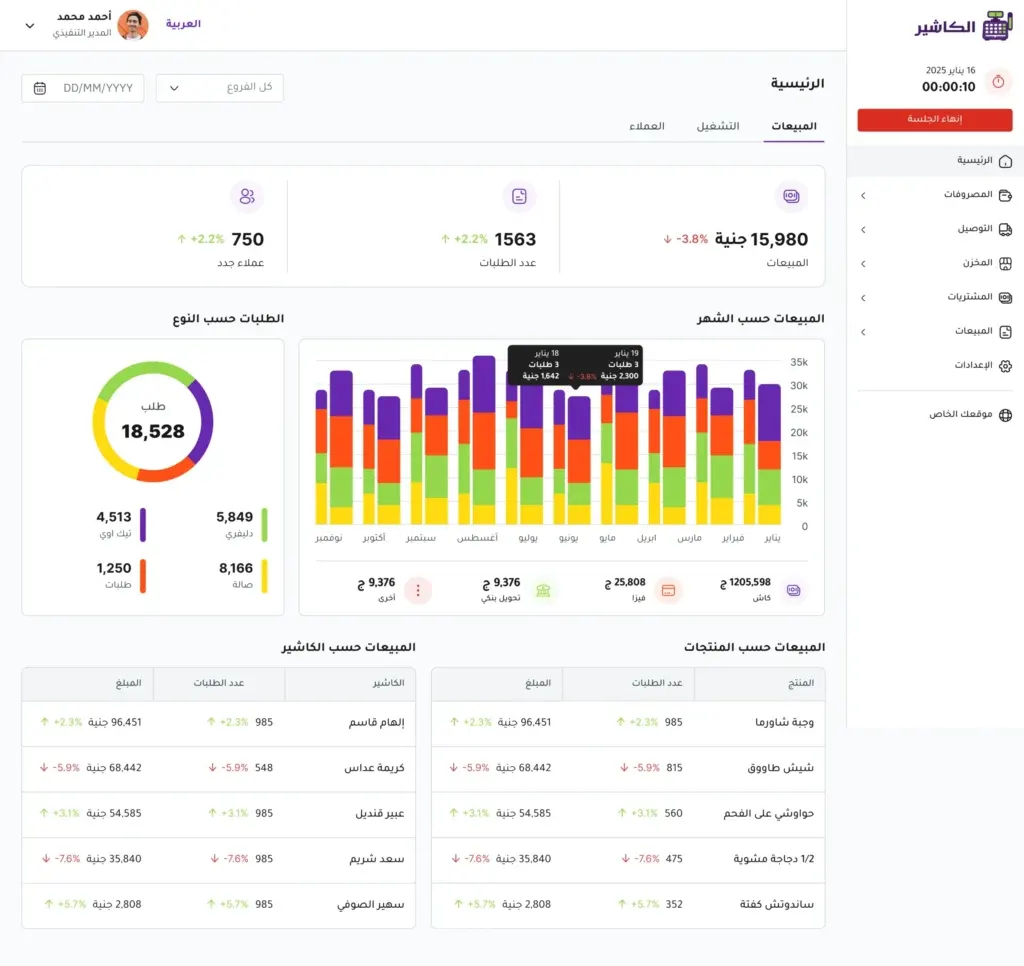
Instead of waiting for a weekly report, the dashboard shows revenue, margin and the best-performing products and staff moment by moment. You can compare two neighboring branches in the same hour, measure the impact of a running discount campaign within its first hours, and quickly stop what isn’t working before the loss grows.
Accepting varied payments securely:
Customers prefer options: chip cards, contactless, local wallets, instant transfers, or even buy now, pay later (BNPL) at the point of sale. Supporting all of these raises the conversion rate and makes the experience feel “natural” to the customer. With end-to-end encryption and card data tokenization, you don’t compromise on security in the process.
Integrations that end double entry:
When a POS integrates with accounting, the online store, shipping and loyalty, data flows automatically: today’s invoice is posted, an online order reserves inventory directly, the shipping label prints with the right address, and customer points are added without error. This reduces routine working hours and lowers the risk of human error.
Components of a POS system
1) Hardware
- POS terminal/touchscreen: This may be a dedicated device, a computer or a tablet. What matters is that it withstands continuous use, has a screen bright enough under strong lighting and is easy to clean in food environments. The interface layout should minimize the number of taps needed to reach best-selling items.
- Barcode/QR scanners: They support 1D (UPC/EAN) and 2D (QR/Datamatrix) to read items, vouchers and membership cards. Choosing the right scanner (wired, wireless or fixed on the counter) affects queue speed and the flow of movement at the checkout.
- Thermal receipt printer + cash drawer: A receipt is more than a slip of paper; it is space for your logo, a discount coupon for the next visit, and a QR code for reviews or joining the loyalty program. The cash drawer is tied to the transaction in software, and every opening is logged, even outside a sale, which adds an important layer of control.
- Customer display: It shows items, prices and taxes while scanning, which increases transparency and cuts down on objections like “the price on the shelf was different.” It can also be used to promote complementary products while customers wait.
- Scale (integrated): In grocery, butcher and sweets shops, the built-in scale reads the weight and issues a scale barcode with dynamic pricing, which saves the cashier time and reduces manual pricing errors.
- Kitchen screens/printers (KDS): In restaurants, they send the order instantly to the right station (grill/salads/drinks) with preparation-time priorities. Shouting and paper tickets drop, and the flow between the dining room and the kitchen improves.
- Network and power infrastructure: A point of sale with no backup internet and no UPS can stop at the worst possible moment. A backup router and an emergency battery protect you from costly outages at peak time.
2) Software
- Sales interface: Fast search, hotkeys for popular items, flexible discounts, automatic taxes, and digital receipts by email/WhatsApp. Every click is counted to cut transaction time.
- Catalog management: SKU codes, variants (size/color), bundles, recipes (in restaurants), multiple units (piece/carton), and images and rich descriptions for the online store.
- Pricing and promotions: Multiple price lists per branch/channel, time-based schedules, a “buy 2 get 1” promotion engine, quantity tiers, and coupons and vouchers with unique, trackable codes.
- Inventory and purchasing: Multiple warehouses, internal transfers, purchase orders with automatic suggestions based on historical sales, and periodic/continuous stock counts using mobile devices.
- Customers and loyalty (CRM): Complete customer profiles (preferred channels, last visit, average basket), membership tiers, redeemable points, and campaign rules that target specific behavior (for example: a customer who hasn’t visited in 60 days).
- Staff and permissions: Precise roles (cashier/supervisor/manager), discount and void limits, tracking of shifts and points of sale, and a goals and rewards board to lift performance.
- Reports and analytics: From the daily summary to item-level margin reports, peak time/day analytics, and exception reports (large discounts, repeated voids, drawer opened outside a transaction).
- Integrations and APIs: Direct connections with accounting, shipping, payment gateways and BI. A documented API means you are not held hostage by a single vendor (vendor lock-in).
- True offline mode: Sales continue with local saving of transactions, then smart syncing that prevents duplicates once the internet is back. This item “saves you” during network outages.
3) Payments and security
- Payment methods: Magnetic stripe (legacy), EMV chip + PIN, contactless NFC (cards/Apple Pay/Google Pay), QR and local wallets, and vouchers/gift cards. Support for split payment (part cash + card) matters for a flexible experience.
- Protection and compliance: E2EE and tokenization for card data, PCI DSS compliance, regular security updates, and the “least privilege” principle for permissions. With these layers, the chance of breaches and bank disputes drops.
- Settlements and refunds: Reports that reconcile receipts against gateway/bank statements, chargeback management within a limited window, and clear return policies that update inventory and loyalty points automatically.
Alcashier: a bilingual point-of-sale platform
Alcashier is more than a checkout screen and a receipt printer; it is an operations platform that simplifies life for business owners from the first click to closing the day. The core idea is that the system combines speed of execution, security in handling payments and data, and accuracy in pricing, inventory and reports, with a bilingual interface that switches instantly between Arabic and English without “manual translation” from one employee to another. This blend cuts transaction time, shortens the learning curve for new staff, and ensures every invoice goes through the same calculation rules (taxes/discounts/promotions) with no confusing exceptions.
Most importantly, Alcashier doesn’t just record the sale; it ties the result to management decisions through real-time reports and analytics that help you see what sells most, what turns over slowest, and when and where your points of sale get busy, so data turns into practical steps: reordering an item, adjusting prices, motivating an employee, or launching a targeted promotion.
The main problems solved: why does this matter today?
The language barrier within the team
In many businesses, an English-only interface means longer training, input mistakes “from oversight,” and system messages that aren’t understood on the spot. “Alcashier” removes this barrier with a truly bilingual interface: buttons, error messages, receipts and reports all switch instantly. This shortens onboarding time for new staff, reduces reliance on “a colleague translating,” and lets a manager who prefers English and a cashier who prefers Arabic work on the same screen without friction. The result? A lower error rate, fewer support calls, and greater adherence to standard procedures.
Continuity when the internet goes down
Blind dependence on the network makes the point of sale freeze at the worst moment (peak time), so queues pile up and trust drops. “Alcashier” bridges this gap with an offline mode: transactions are recorded locally with timestamps and the device/user identity, with invoice numbers protected from duplication. When the connection returns, smart syncing filters out duplicates, automatically runs inventory and loyalty reconciliations, and flags any conflicts for the supervisor to resolve (such as the last item being sold on two devices). In practice, this means sales don’t stop, data isn’t lost, and accuracy isn’t sacrificed.
Simplicity and affordability: how does this show up in reality?
An intuitive interface reduces the number of clicks to reach the most common items, shows promotions and taxes clearly, and supports fast search and scanning by barcode and QR. The result is that training an employee doesn’t require a “technical course”; short sessions with illustrated handbooks are enough to start work with confidence. Financially, Alcashier offers competitive pricing and flexible payment options, which lets small and medium businesses reach features that used to be considered “enterprise-grade”: analytics, detailed reports, stock alerts and e-invoicing, but without a steep hardware bill or an in-house tech team. Lower cost doesn’t mean cutting core features: you’ll find the same tools you need every day, but at a lower level of complexity that lets you focus on selling rather than managing the system.
Features and benefits
Bilingual support
A truly Arabic/English interface, not a “translation where some parts are Arabic and some English.” Everything switches: menus, buttons, messages, receipts, and even reports. This gives a consistent experience for every role: the cashier works smoothly in Arabic, and the manager reviews reports in English if they wish, with the ability to switch mid-process without confusion. The direct impact: shorter training time, clearer internal communication, and fewer mistakes in sensitive operations such as discounts and voids.
Working without an internet connection
Selling continues through a network outage, and everything is stored securely on the device. When the connection returns, transactions are sent in batches along with inventory reconciliation, loyalty updates and e-invoices. The system provides a conflict-resolution mechanism (for example: the last item sold from two devices) and shows the supervisor a report of what happened during the outage. The result: no stalled queues, no improvised paper ledgers, and no data loss.
Easy training
The interface is designed around everyday scenarios: shortcuts for the fastest-moving items, smart search, visual highlighting of discounts and taxes, and simple return/void forms with clear permissions. A new employee can reach proficiency through a short session and simulation exercises, instead of days of trial and error. This reduces wasted time and team frustration, and boosts confidence at peak time.
E-invoicing
Create organized, archivable e-invoices with the required fields and send them to the customer by email or via a link/QR. This boosts professionalism and reduces disputes, and makes it easier for management and accounting to reconcile and close periods. It also cuts the time to find an old invoice down to seconds by searching by name/date/amount.
Effective inventory management
Real-time stock visibility in every branch and warehouse, with smart alerts when quantities run low, expiry reports (for food/medicine), and continuous counting via mobile devices. The system supports item variants (size/color), bundles, and recipes (for restaurants) that link the finished item to its ingredients to determine margin and waste precisely. The result: fewer lost sales, and less capital tied up in stagnant stock.
Competitive pricing and added value
A flexible subscription and balanced service fees let you get advanced capabilities (analytics, integrations, reports) without enterprise-level cost. And if you build a total-cost model for 24–36 months that includes the subscription, payment fees, hardware, training and maintenance, you’ll find that Alcashier often saves money by reducing errors, speeding up service and cutting manual work hours.
Enabling growth: from a payment tool to an operating partner
Alcashier combines ease of use with a wide range of functions, so you’re not limited to just recording sales. Reports reveal demand trends and peak times, stock alerts prevent your best sellers from running out, and e-invoicing and good organization make it easier to expand to a second and third branch. You can also take advantage of integrations (accounting/online store/shipping) to become omnichannel without manual effort, which frees you to focus on developing the menu/promotions and building customer relationships instead of chasing Excel files.
Practical scenarios
Quick-service restaurant
A sales interface with large buttons for popular items, modifiers (no salt/extra cheese), bill splitting when needed, and a KDS for the kitchen that routes orders by station. During an internet outage, the cashier keeps working, and the order reaches the kitchen with no delay; when the connection returns, payments are settled and loyalty points are updated. The result: an order line that never stops, correct receipts, and shorter waiting times.
Specialty café
Seasonal menus that change quickly, loyalty/gift cards, and daily reports showing the fastest-moving items by the hour so you can adjust barista prep at peak time. Alerts for running out of coffee beans/milk prevent the “sorry, we’ve run out,” and the bilingual interface helps a linguistically diverse team work without repeatedly asking “what does this message mean?”
Grocery store
Integration with a scale and PLU codes, scale barcode printing, expiry alerts, and clearance campaigns for items nearing expiry. E-invoicing simplifies reconciliation, and waste reports help you cut losses through better order planning. At peak time, fast scanning + contactless payment noticeably shorten the queue.
How do you measure the impact after adopting Alcashier?
1) Transaction time
Measure the time from the first barcode scan to payment confirmation; extract it from the timestamps in the Alcashier system (scan_start → tender_approved). Calculate the mean, median and standard deviation, and compare periods (before/after adopting the system, days of the week, peak/quiet). Any steady drop (say 20–30%) translates directly into shorter queues and more transactions per hour for each cashier. To understand where time is lost, measure sub-stages: scan time, choosing the payment method, entering the PIN, printing the receipt. Tip: watch the long tail of slow transactions; cutting it often yields a bigger effect than lowering the average alone.
2) Error and return rates
Track point-of-sale errors such as unauthorized discounts, voids, “price not found,” repricing at the cashier, as well as the return rate within 7–14 days after purchase. Link every error to the employee, branch and period to spot patterns that can be fixed by training or by tightening permissions. A drop in these indicators means protecting margin and reducing operational waste. Introduce permission rules (approval thresholds) and daily audit reports that highlight abnormal cases (such as a discount >20% or 3 consecutive voids). Don’t forget to separate returns due to a defect from returns due to a pricing/scanning error; the latter is a direct indicator of cashier performance.
3) Inventory turnover and stock-outs
Compare the stock-out rate of your best sellers before/after adopting Alcashier: have the days of shortage per A-class item gone down? If so, it shows that real-time alerts and reports are feeding replenishment decisions quickly. Watch the turnover of slow categories: if turnover rises and days of coverage (DOH) shrink, pricing and alerts are working well. Link Alcashier with inventory in real time (perpetual) so movements show up immediately, and enable ROP alerts per branch to prevent a local stock-out while other branches hold a surplus. Measure weekly and monthly while controlling for seasonality so you don’t confuse the system’s effect with natural changes in demand.
4) Payment approval rate
From the payment gateway logs, extract the approval rate = approved ÷ attempts, and slice it by card type, issuing bank, network, and device/branch. After tuning the POS settings (stable connection, merchant configuration, 3-D Secure settings), you should see a tangible improvement; every additional percentage point means higher conversion and extra sales at no marketing cost. Analyze common decline codes (insufficient funds, timeout, do not honor) to address what you can control (network connection, request timeout, smart retry). During peak time, enable automatic failover to alternative payment channels to limit lost sales.
5) Average transaction value and items per receipt (ATV & Items/Receipt)
ATV = revenue ÷ number of transactions, and Items/Receipt = number of units ÷ number of transactions. Watch the change after enabling complementary/alternative upsell suggestions on the cashier screen or the customer display. Improvement in both indicators together usually means the cross-sell is working without spoiling the customer experience. If ATV rises while items per receipt fall, the cause may be higher prices rather than cross-selling; so analyze the sales mix and measure the offer acceptance rate (attachment rate) for complementary items. Test different texts and offers (A/B across branches/shifts) to tune what actually works.
An adoption plan (30–60–90 days) for Alcashier
Overall goals of the plan
Stable operation in every branch with a “true” offline mode.
Data accuracy (items/prices/taxes/inventory) ≥ 99%.
Noticeable improvement in 3 indicators: transaction time, error/return rate, stock-out cases.
- R (Responsible): The project lead (from your side) + the branch supervisor.
- A (Accountable): The operations manager/owner.
- C (Consulted): The accountant/finance, the IT team, a representative of the Alcashier provider.
- I (Informed): The cashiers/field team.
Days 0–30: foundation, setup and testing
Week 1 Clean and prepare the data
Tasks:
Standardize item names, create fixed SKUs/codes, and define variants (size/color) and bundles where needed.
Set up price lists (standard/promotional) with effective dates.
Define taxes according to local requirements, and set up receipt templates (Arabic/English).
Deliverables:
A final catalog file (SKU, name, category, price, tax, barcode/PLU code).
A brief pricing/discount policy document (who changes what, when, and within what limits).
Acceptance criteria:
100% match between the catalog file and what appears in the sales interface.
The receipt prints correctly in Arabic/English (logo + QR if present).
Week 2 Set up branches, permissions and loyalty
Tasks:
Create branches/warehouses and permission limits (cashier/supervisor/manager).
Activate the loyalty/gift program (if any) with rules for earning/redeeming points.
Set up payment methods (cash/card/NFC/wallets/vouchers) and test each one.
Deliverables:
A permissions matrix (who discounts? who voids? the maximum percentage for each role).
A simplified loyalty guide: how to add/redeem points at the register.
Acceptance criteria:
Each role sees only the appropriate menus.
No discount above the threshold can go through without supervisor approval.
Week 3 Full testing: printing/barcode/inventory/payments/offline
Tasks:
Test barcode/PLU/scale (if any) on random items.
Payment trials: chip/NFC/wallets/vouchers + void/return.
Simulate an internet outage: sell 20 invoices per device, then reconnect and sync; review conflict resolution.
Test printing (receipts/labels) and the customer display.
Deliverables:
A UAT report covering passes/failures and the fixes required.
Screenshots/invoice numbers for offline scenarios before/after syncing.
Acceptance criteria:
A success rate of ≥ 98% in payment scenarios.
No invoice lost in offline mode; conflict resolution works according to the agreed policy.
Week 4 Hands-on training + phased launch outside peak hours
Tasks:
Short training sessions (45–60 minutes) for cashiers/supervisors with exercises: discount, void, partial return, bill splitting, offline.
Set up the “Quick” buttons for the fastest-moving items, and arrange complementary items next to them.
Phased go-live: an off-peak shift first, then gradually extend operating hours.
Deliverables:
A training attendance list + a practical test (10 questions/scenarios).
A launch-day runbook (contact numbers, rollback steps if needed).
Acceptance criteria:
The median transaction time drops by ≥ 15% against the baseline during off-peak hours.
0 critical failures during the phased operation.
Days 31–60: integrations, measurement, fine-tuning
Weeks 5–6 Integrations (accounting/online store/shipping)
Tasks:
Connect accounting (automatic posting: sales/returns/taxes/payment fees).
Sync the catalog and inventory with the online store, and enable Click & Collect if needed.
Set up the shipping/delivery integration (waybills/tracking).
Deliverables:
Sample journal entries approved by finance.
An online order is reserved in inventory and appears at the register for pickup/shipping.
Acceptance criteria:
A “one-click” daily close with no differences exceeding 0.5% of revenue.
Online store sync time < 5 minutes for catalog/inventory items.
Week 7 Custom reports and tracking dashboards
Tasks:
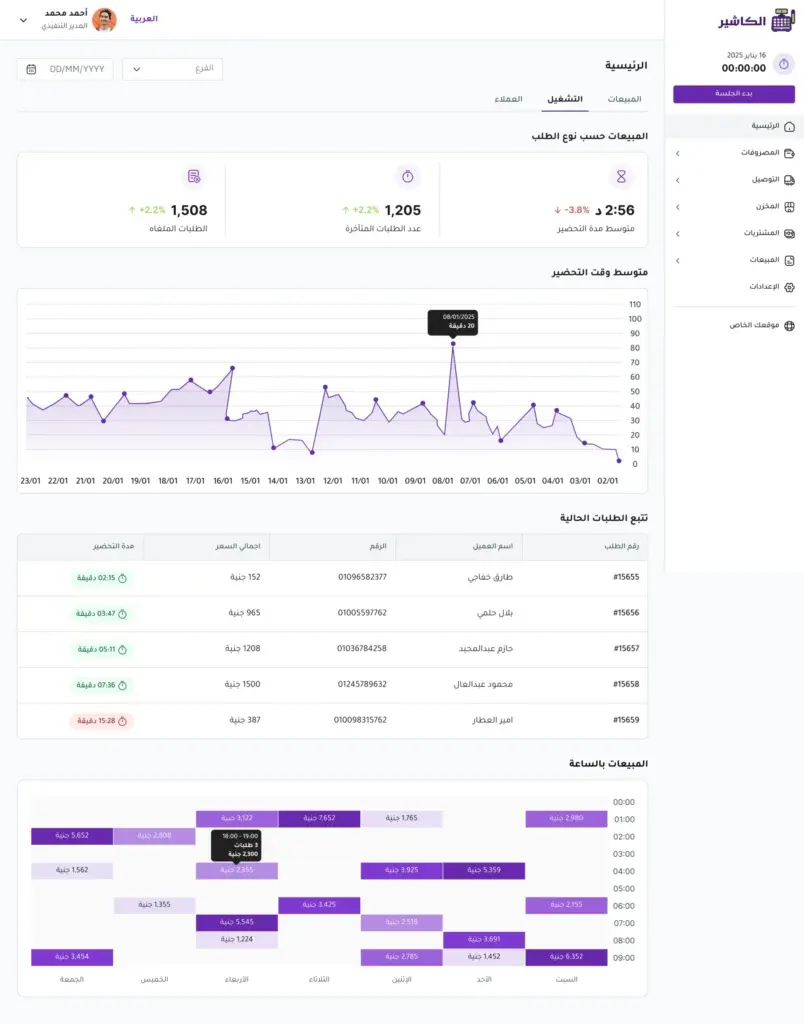
Build a metrics dashboard: transaction time (median/95th percentile), ATV, items/receipt, payment approval, stock-outs for best sellers.
Schedule weekly email reports for managers and daily ones for supervisors.
Deliverables:
A live dashboard + scheduled PDF/Excel reports.
A document explaining the indicators and how to act on each case.
Acceptance criteria:
The dashboard refreshes automatically every 15 minutes (or at the end of each hour).
Indicator readings are consistent across branches (agreed definitions).
Week 8 Improve the interface and alerts
Tasks:
Review the Quick buttons based on 4 weeks of data (the top 20 items).
Clean up alerts: keep only the actionable ones (imminent stock-out, falling payment approval, high voids).
Launch complementary bundles (cross-sell) and measure their effect on ATV/items per receipt.
Deliverables:
Release an updated interface (Layout V2).
A simple A/B report for the complementary bundles.
Acceptance criteria:
ATV improves by ≥ 5% or items per receipt by ≥ 0.2 within two weeks.
Days 61–90: security, sustainability and expansion
Week 9 Security audit and backup
Tasks:
Review roles and permissions according to the least-privilege principle.
Test backup/restore, and schedule updates outside peak hours.
Audit the audit logs: large discounts/voids/drawer opened outside a transaction.
Deliverables:
A security audit report + a remediation plan.
A scheduled-updates policy + a rollback point.
Acceptance criteria:
No shared accounts, updated passwords/PIN codes, a backup successfully tested.
Week 10 Tune promotions to margin
Tasks:
Analyze category margins and adjust promotions/bundles so they don’t hurt profitability.
Apply tiered discount rules and monitor exceptions.
Deliverables:
A promotions matrix tied to margin and category.
A margin report before/after the promotion.
Acceptance criteria:
Overall category margin does not drop by > 1–2 points unless sales volume rises enough to justify it.
Weeks 11–12 Payment review and expansion
Tasks:
Review the approval rate by method/hour/branch, and work with the payment provider on improvement (3D Secure/NFC).
Prepare an expansion plan for new branches (checklists/hardware/network/training/timeline).
Deliverables:
A payment acceptance report with corrective actions.
A playbook for opening a new branch (reusable).
Acceptance criteria:
Payment acceptance > 97–98%, and an expansion plan approved by operations and finance.
Common risks and how to manage them
| Risk | Early warning sign | Prevention | Response | Recovery |
|---|---|---|---|---|
| Dependence on the internet | Slow or declined payments at peak time | True offline + a backup connection line + UPS | Temporarily switch to cash/NFC, reduce background data | Sync after reconnecting + a discrepancy report |
| Vendor lock-in | Difficulty extracting data | Require Export/API in the contract | Enable periodic CSV/API backups | A tested data migration plan |
| Staff overwhelmed by alerts | Notifications being ignored | Cut alerts down to the actionable ones | Monthly review of the alert list | Targeted training + documentation |
| Inadequate training on abnormal cases | Wrong voids/returns | Mandatory simulation scenarios | Instant support + quick handbooks | Retraining focused on the gaps |
| Postponing updates | Recurring failures | An off-peak update schedule + pre-testing | Immediate rollback to a stable version | A planned maintenance window and compensation |
| Poor data quality | Differences in prices/taxes/names | Catalog governance + a data owner | Immediate correction + a change log | Weekly review + locking sensitive fields |
| Hardware compatibility | A printer/scanner that doesn’t work | A supported-hardware list + testing before purchase | A temporary substitute/drivers | A phased replacement plan |
| Security and permissions | Excessive discounts/drawer openings | Least-privilege principle + approvals | Temporary suspension/investigation | Tune permissions + training |
Frequently asked questions (FAQs)
What hosting options are available for a POS system?
Fully cloud: automatic updates, central management, access from anywhere, + true offline mode for outages. When to choose it? When you have multiple branches and want to reduce server management.
On-premises/hybrid: a server at the branch with syncing to the cloud, to meet local data residency requirements or cope with weak internet. When to choose it? With strict regulatory constraints or very high-volume points of sale.
Decision criteria: where data is stored, the required recovery time, internet quality, and total cost of ownership over three years.
How are data ownership and backup (Backup/DR) handled?
Ownership: It stays yours by law; require a full export (CSV/JSON/API) with no restrictions.
Backup: an automatic schedule + a quarterly restore test. Define RPO/RTO (for example RPO ≤ 15 minutes, RTO ≤ 1 hour).
Restore: a clear rollback point before every major update + an emergency runbook.
Does the system support multiple currencies and tax entities?
Multiple price lists + a display currency different from the accounting currency.
Rounding rules and automatic handling of exchange-rate differences.
Tax profiles for each entity/branch, independent closing, and separate compliance reports.
What about migrating from a previous system (Migration)?
Steps: clean the data → map the fields → trial import (UAT) → a short parallel run → final cutover.
Includes: catalog/customers/inventory/gift balances/loyalty points/barcode codes.
Migration success: ≥ 99% match, a correct test invoice, and before/after reports with no material differences.
How are serial numbers, IMEI, and lots/expiry managed?
Enforce serial number scanning at sale and return, with duplicate prevention.
Track lots and expiry dates and apply FEFO for perishable goods.
Quick recall reports: what was sold? to whom? and from which lot?
What are the policies for complex discounts and stacking promotions?
Clear priority: voucher → basket promotion → list price.
Combinability: a “stackable/non-stackable” matrix + discount caps by role.
Margin protection: a minimum margin, an alert when it’s breached, and a full audit log.
Does it support tips, fees and service charges, and splitting them among the team?
Enable tips by cash/card with pooling/splitting options per shift.
Automatic service charges with exceptions (takeaway/minimum).
Distribution reports and correct tax compliance for tips and fees.
How are the safe and cash managed (Cash Management)?
A blind count when opening/closing the shift + cash drops to the safe.
Alerts for drawer openings outside a transaction and cash discrepancy reports.
Drawer cash limits and breach notifications.
What are the hardware and support plans?
A list of approved hardware (scanners/printers/scales) and supported OS versions.
Automatic print failover alternatives and Cloud Print when something breaks.
Hardware SLA: critical spare parts on site, and a defined response time.
Is there a Mobile POS or Self-Checkout?
Mobile POS: reduces queues (queue-busting) + contactless payment.
Self-Checkout: remote monitoring, age/weight verification for sensitive items, and calling a supervisor on exceptions.
Both work offline with later syncing without duplication.
Can tables be managed for restaurants, with table service?
A table map, merging/moving invoices, bill splitting, and tracking seating time.
Sending items to the kitchen by station, and supporting ordering via QR/at the table.
How are returns and exchanges handled across branches?
A central policy to accept a return at any branch, verifying the receipt/serial number.
Automatic updates to inventory, loyalty points and financial reconciliations.
Quality rules: checking the item’s condition and the reason for return, and fraud-pattern reports.
Does it support gift cards and reloadable balances?
Digital/physical cards with balance tracking, expiry dates and partial use.
Importing balances from previous systems and liability reports for finance.
Protection against duplication and voucher tampering.
How are sales commissions and employee targets calculated?
Commission rules by item/category/margin with clawback on returns.
Daily/monthly targets, live performance boards, and alerts when discounts are exceeded.
Clear dispute reports showing the basis and the excluded transactions.
Are there tools to measure customer satisfaction?
NPS/CSAT via a QR code on the receipt or the customer display/a follow-up message.
Linking feedback to the invoice, the employee, and resolution tickets.
Text analytics for keywords and feedback for trainers.
What about age verification and regulatory restrictions?
Trigger a check when a restricted item is scanned + scanning an ID or entering a date of birth.
Audit logs, a defined legal retention period, and filtering reports by approvals.
Set up automatic decline policies when there is no match.
Can subscriptions or recurring invoices be sold from the point of sale?
Create recurring plans (monthly/yearly) with tokenization and smart retry (dunning).
Proration on upgrades/downgrades, and correct tax invoices.
The subscription is sold and managed from the POS with obligations reports.
What customization and custom field capabilities are there?
Custom fields for customer/item/transaction + conditional visibility rules.
Customizable receipt/invoice templates (logo/languages/QR/campaigns).
Permissions to control who can edit the templates.
How are updates and advanced security handled?
Staging channels before production + scheduled maintenance windows and rollback.
2FA/SSO, IP restrictions, and the least-privilege principle for roles.
Automatic security updates and monitoring of abnormal activity (discounts/voids).
What are the API limits and integration tools?
REST + webhooks for orders/inventory/payments, and SDKs where available.
Secure keys, idempotency keys, and rate limits.
A sandbox for testing and ready-made example documentation.
How is the day closed (Z/End-of-Day)?
One-click closing: reconcile cash/cards/wallets, and print or automatically export the Z report.
Reconcile payment gateways with differences within a threshold (for example ≤ 0.5%).
Over/Short reports and quick investigation steps.
What are the support channels and SLA?
Multiple channels (phone/WhatsApp/tickets) with response/resolution times for each severity.
Availability commitments (uptime), a declared maintenance window, and proactive communication about outages.
A knowledge base, video tutorials, and ready-made templates.
Does it support printing labels and shelf price tags?
Dynamic barcode/label templates (price/unit/expiry) and batch printing.
Generating EAN/UPC when needed and syncing price changes to electronic shelf labels (ESL).
A label issuance log to track “when the price changed.”
How is privacy compliance (PII) managed?
Minimizing data collection, encryption at rest and in transit, and fine-grained access controls.
Time-based retention policies, and masking/deletion at the customer’s request (DSR).
Consent records and clear privacy notices on the receipt/forms.
Conclusion
Alcashier meets three core needs in the market: bilingual support that closes the training and communication gap, offline operation that keeps sales running at peak time, and ease of use that cuts errors and speeds up service, along with live inventory management, e-invoicing, reports and analytics, and integrations that make the system part of your business ecosystem rather than an isolated island. By applying a realistic adoption plan and monitoring just 3–5 performance indicators at first, you’ll turn the point of sale from a “place for collecting payments” into an engine of continuous improvement that raises revenue, protects margin, and gives you more confidence in expansion decisions.

How POS systems help build loyalty among Saudi customers in a highly competitive market
In the Saudi market, which is seeing rapid growth and fierce competition between brands and stores, customer loyalty has become a decisive factor for business success…
Sales software for restaurants and retail: key features that give Alcashier the edge
Sales software (POS) is the system that ties the sales screen to inventory, taxes, customers and reports in one seamless experience. The idea isn’t “invoicing”…
Why do small businesses need POS systems?
In today’s business environment, where competition is intense and customers have become more aware and experienced, relying on traditional ways of managing sales such as invoices…
The post What is a POS? appeared first on Alcashier.